
개요
이번 글에서는 Valkey(Redis 포크 프로젝트)에서 커스텀 커맨드를 추가하는 작업을 해볼 예정이다.
Redis는 들어봤어도 Valkey는 들어보지 못한 분들에게 간략하게 설명하자면, Valkey는 널리 사용되는 인메모리 데이터 저장소인 Redis에서 포크된 오픈소스 프로젝트이다.
둘의 가장 중요한 차이점은 라이센스이다. 기존 오픈소스였던 Redis가 점차 상업적 방향으로 나아가면서 커뮤니티 중심의 개발을 추구하는 사람들이 중심이 되어 상업화 전 Redis를 fork하여 Valkey가 탄생하였다.
이번 글에서는 Valkey를 기반으로 커스텀 커맨드(custom command)를 직접 추가해보는 작업을 해볼 예정이다.
실습은 Ubuntu Desktop 24.04.2 LTS 환경에서 진행하며, Valkey의 소스 코드를 직접 수정하고 컴파일하는 방식으로 진행하겠다. (Windows에서 진행하려면 WSL에서 진행하면 됨)
Valkey를 Clone하고 컴파일하기
Valkey 프로젝트는 아래 링크에서 확인 가능하다.
https://github.com/valkey-io/valkey
(참고로 본인은 valkey를 fork뜬 실습 환경에서 진행할 예정이라 폴더 경로가 openup-2025-valkey로 뜰텐데 만약 이 글을 보고 따라해보고 싶다면 이 부분은 무시해주시길..)
위 링크에서 경로를 복사하고 git Clone 명령어를 실행한다.
git clone https://github.com/valkey-io/valkey.git
그럼 이렇게 Valkey 프로젝트가 클론되는데,

여기서 make 명령어를 통해 컴파일하면
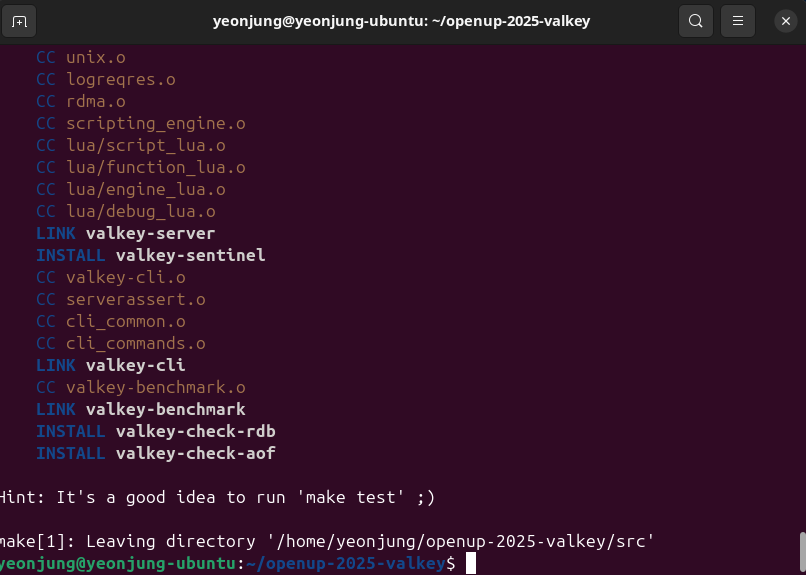
이런 식으로 src/ 폴더에 valkey-server, valkey-cli를 포함한 여러 파일들이 생성된다.
그럼 src/valkey-server 을 날려주면 아래와 같이 valkey가 실행된다.

src 폴더에는 컴파일되면 valkey-cli도 확인할 수 있다.
실행시켜서 valkey의 작동 여부를 확인하자.

나의 command 추가하기
이제 컴파일도 해보았으니 실제로 커맨드를 추가할 차례다.
커맨드를 추가하기 위해서는 구조를 파악해야 한다.
src/commands.h 파일 내부
/* Must be compatible with RedisModuleCommandArg. See moduleCopyCommandArgs. */
typedef struct serverCommandArg {
    const char *name;
    serverCommandArgType type;
    int key_spec_index;
    const char *token;
    const char *summary;
    const char *since;
    int flags;
    const char *deprecated_since;
    int num_args;
    struct serverCommandArg *subargs;
    const char *display_text;
} serverCommandArg;위 코드는 Valkey (Redis) 커맨드 시스템에서 사용되는 구조체 serverCommandArg의 정의다.
이 구조체는 Valkey 커맨드의 각 인자(argument)를 설명하고 문서화하고 검증하는 데 사용된다.
src/server.h 파일 내부
struct serverCommand {
    /* Declarative data */
    const char *declared_name;    /* A string representing the command declared_name.
                                   * It is a const char * for native commands and SDS for module commands. */
    const char *summary;          /* Summary of the command (optional). */
    const char *complexity;       /* Complexity description (optional). */
    const char *since;            /* Debut version of the command (optional). */
    int doc_flags;                /* Flags for documentation (see CMD_DOC_*). */
    const char *replaced_by;      /* In case the command is deprecated, this is the successor command. */
    const char *deprecated_since; /* In case the command is deprecated, when did it happen? */
    serverCommandGroup group;     /* Command group */
    commandHistory *history;      /* History of the command */
    int num_history;
    const char **tips; /* An array of strings that are meant to be tips for clients/proxies regarding this command */
    int num_tips;
    serverCommandProc *proc; /* Command implementation */
    int arity;               /* Number of arguments, it is possible to use -N to say >= N */
    uint64_t flags;          /* Command flags, see CMD_*. */
    uint64_t acl_categories; /* ACl categories, see ACL_CATEGORY_*. */
    keySpec *key_specs;
    int key_specs_num;
    /* Use a function to determine keys arguments in a command line.
     * Used for Cluster redirect (may be NULL) */
    serverGetKeysProc *getkeys_proc;
    int num_args; /* Length of args array. */
    /* Array of subcommands (may be NULL) */
    struct serverCommand *subcommands;
    /* Array of arguments (may be NULL) */
    struct serverCommandArg *args;
#ifdef LOG_REQ_RES
    /* Reply schema */
    struct jsonObject *reply_schema;
#endif

    /* Runtime populated data */
    long long microseconds, calls, rejected_calls, failed_calls;
    int id;           /* Command ID. This is a progressive ID starting from 0 that
                         is assigned at runtime, and is used in order to check
                         ACLs. A connection is able to execute a given command if
                         the user associated to the connection has this command
                         bit set in the bitmap of allowed commands. */
    sds fullname;     /* Includes parent name if any: "parentcmd|childcmd". Unchanged if command is renamed. */
    sds current_name; /* Same as fullname, becomes a separate string if command is renamed. */
    struct hdr_histogram
        *latency_histogram;        /* Points to the command latency command histogram (unit of time nanosecond). */
    keySpec legacy_range_key_spec; /* The legacy (first,last,step) key spec is
                                    * still maintained (if applicable) so that
                                    * we can still support the reply format of
                                    * COMMAND INFO and COMMAND GETKEYS */
    hashtable *subcommands_ht;     /* Subcommands hash table. The key is the subcommand sds name
                                    * (not the fullname), and the value is the serverCommand structure pointer. */
    struct serverCommand *parent;
    struct ValkeyModuleCommand *module_cmd; /* A pointer to the module command data (NULL if native command) */
};위 코드는 커맨드 이름, 설명, 핸들러 함수, 인자 정의 등을 한 덩어리로 묶은 구조체이다.
이제 커맨드를 추가해보자.
아래 세 개의 파일에 코드를 추가해주면 된다.
- src/server.c
- src/server.h
- src/commands.def
1. 먼저 server.c 파일에서 void echoCommand 함수 밑에 나만의 함수를 정의하자.
아래 예시에서는 함수의 동작은 echo 커맨드와 동일하게 가져가기 위해 echoCommand 함수 내부와 동일하게 작성한다.
// src/server.c
// ...
void echoCommand(client *c) {
    addReplyBulk(c, c->argv[1]);
}

void echoYeonjung(client *c) {
    addReplyBulk(c, c->argv[1]);
}
2. 그 다음 server.h 파일에서 정의한 함수를 선언해준다.
// src/server.h
/* Commands prototypes */
void authCommand(client *c);
void pingCommand(client *c);
void echoCommand(client *c);
void echoYeonjung(client *c);
// ...
3. 마지막으로 commands.def에서 문서화를 위해 커맨드 정보를 추가해준다.
// src/commands.def
{MAKE_CMD("echoYeonjung","Returns the given string.","O(1)","1.0.0",CMD_DOC_NONE,NULL,NULL,"connection",COMMAND_GROUP_CONNECTION,ECHO_History,0,ECHO_Tips,0,echoYeonjung,2,CMD_LOADING|CMD_STALE|CMD_FAST,ACL_CATEGORY_CONNECTION,ECHO_Keyspecs,0,NULL,1),.args=ECHO_Args},
4. 그리고 make 명령어를 통해 컴파일하고 src/valkey-server로 valkey를 띄워서 확인해보면..
make distclean   # 이전 빌드 아티팩트 전부 삭제
make             # 다시 전체 빌드

ps aux | grep valkey    # 이걸로 띄워진 Valkey PID 확인
kill <PID>              # Valkey 킬

src/valkey-server  # 서버 실행!
src/valkey-cli     # CLI 들어가서

echoYeonjung test  # 만든 명령어 실행

이렇게 잘 작동하는 것을 확인할 수 있다.
참고
앞서, commands.def에 코드를 추가하였는데, 때문에 아래와 같이 등록된 커맨드를 확인할 수 있다.
COMMAND INFO echoYeonjung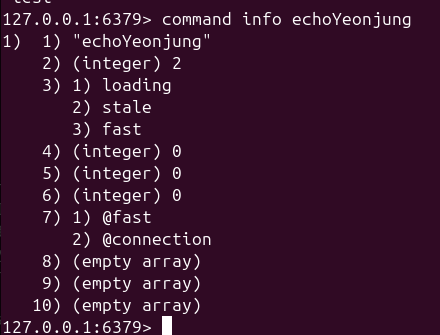
commands.def에 코드를 추가하면서 ‘이 명령어는 공식적으로 valkey의 명령어야!’라고 할 수 있는 것이다.
만약, valkey 프로젝트에 새로운 명령어를 만들어서 컨트리뷰트 할 일이 있다면, 위와 같은 방식으로 commands.def 파일에도 명령어의 정보를 추가하는 것이 올바른 방향이라고 볼 수 있다.
